Catch-All Email Detection: Best Practices for Bulk Data
Handle catch-all addresses in bulk campaigns: use advanced verifiers with confidence scores, segment and risk-score lists, test small sends, and automate re-verification.

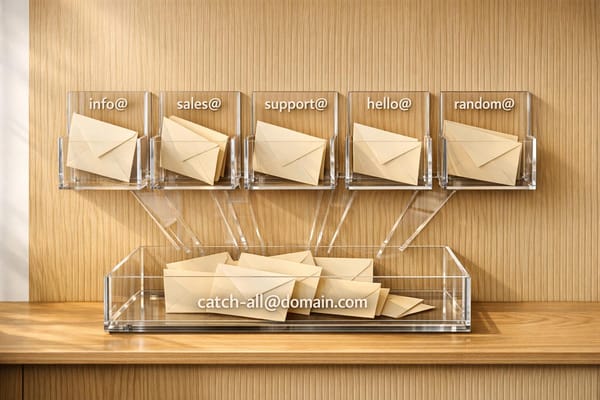
Catch-all email addresses can be a challenge for bulk email campaigns. These domains accept all emails, making it difficult to verify specific inboxes. Here's why this matters and what you can do:
- Why It’s Important: Catch-all domains make up 40–60% of B2B emails. If not handled properly, they can cause bounce rates to exceed 9%, harm your sender reputation, and even lead to blacklisting.
- The Risk: High bounce rates signal poor list quality to email providers. Spam traps on catch-all domains can further damage deliverability.
- The Solution: Use advanced email verification tools with confidence scoring (0–100%). These tools analyze activity patterns and engagement history to assess risk more accurately than traditional methods.
Key Steps to Manage Catch-All Emails:
- Choose the Right Tools: Select email verifiers that offer confidence scoring, signals-based analysis, and Secure Email Gateway (SEG) awareness.
- Segment Your Results: Organize emails into categories like valid, invalid, catch-all (high/low confidence), and unknown. Focus on high-confidence catch-all addresses for outreach.
- Assign Risk Scores: Evaluate catch-all emails based on role-based patterns, acquisition source, and engagement history.
- Test Before Full Sends: Start with small batches and monitor metrics like bounce rates, open rates, and spam complaints.
- Maintain List Hygiene: Re-verify email lists every 60–90 days and automate these processes where possible.
Tools to Consider:
- Enrichfox.ai: Offers 99% accuracy, confidence scoring, and competitive pricing at $0.00025 per verified email.
- ZeroBounce: Includes AI-based scoring with high precision but at a higher cost.
- Hunter: Focuses on pattern-based verification for publicly listed emails.
By following these steps and using the right tools, you can minimize risks, protect your sender reputation, and improve engagement rates with your email campaigns.
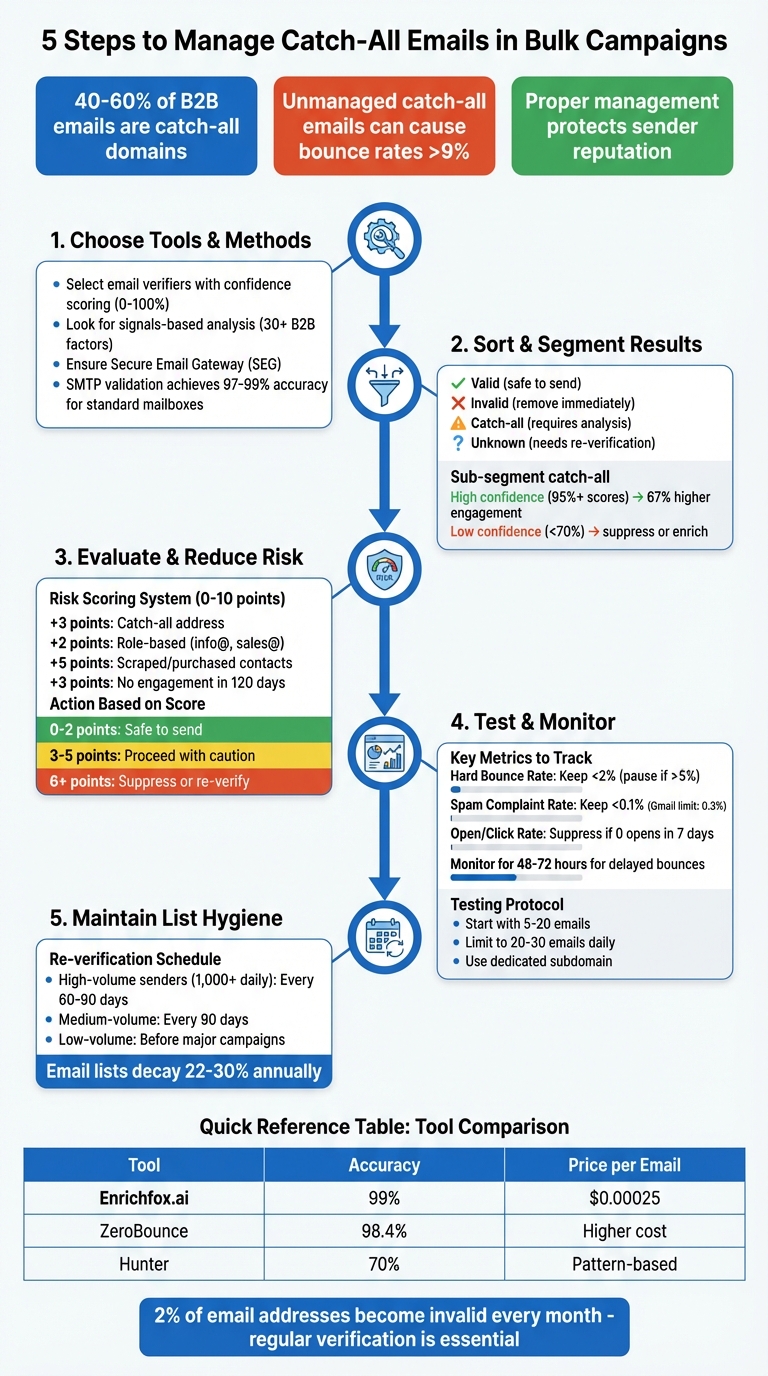
5-Step Process for Managing Catch-All Emails in Bulk Campaigns
Step 1: Choose Tools and Methods for Detection
Pick an Email Verification Tool
When selecting an email verification tool, it’s essential to go beyond basic checks. Traditional SMTP verifiers often fall short, labeling 30%–40% of B2B contacts as "unknown" or "risky" because they can't bypass catch-all configurations. Modern tools use signals-based analysis, which evaluates over 30 B2B-specific factors, like activity patterns and engagement history, to determine whether a mailbox is active. This method works hand-in-hand with multi-layered processing pipelines, ensuring more accurate validation even at scale.
Prioritize tools offering confidence scoring instead of just valid/invalid labels. Scoring systems - ranging from 0–100% or categorized as Low, Medium, and High risk - allow you to make informed decisions about which addresses to keep. For example, platforms like Enrichfox.ai deliver 99% accuracy, label catch-all addresses clearly, support bulk enrichment, and provide API integration at competitive pricing.
Another must-have feature is Secure Email Gateway (SEG) awareness. Many corporate servers use catch-all responses as a security measure, and advanced tools can account for these configurations. Some platforms even match email formats against known corporate patterns, improving verification accuracy for domains that accept all incoming mail.
Learn How SMTP Validation Works
SMTP validation is the backbone of email verification. It works by resolving MX records, connecting via TCP on port 25, and using the RCPT TO command to check if a mailbox exists. A valid mailbox returns "250 OK", while nonexistent ones respond with "550 User not found".
To identify catch-all domains, verifiers send a test email to a dummy address like random123xyz@domain.com. If the server responds with "250 OK" for this fake address, the domain is flagged as catch-all. However, SMTP validation alone can’t confirm whether a specific mailbox exists on a catch-all domain, as these servers accept everything at the protocol level. This limitation is why advanced tools layer behavioral analysis on top of SMTP to resolve uncertainties.
SMTP validation achieves 97%–99% accuracy for standard mailboxes, but about 18%–22% of B2B domains use catch-all configurations. Lists verified through SMTP typically experience a 1.2% bounce rate, compared to 8.4% for unverified lists. Understanding these basics is key to processing large datasets efficiently.
Run Bulk Validation on Large Datasets
Bulk validation combines SMTP and behavioral analysis with a multi-layered approach to handle large datasets. Processing over 100,000 records requires robust infrastructure, including IP rotation, rate limiting, and concurrent processing, to avoid server blocks. Before starting, clean your data by removing syntax errors, duplicates, and fake addresses to save time and reduce costs.
A multi-step pipeline is essential for bulk validation:
- Syntax checks to catch formatting errors
- DNS/MX record verification to confirm domains exist
- Disposable domain filtering to remove temporary addresses
- SMTP or signals-based analysis for final verification
This step-by-step process ensures resources aren’t wasted on invalid addresses. For large B2B datasets, signals-based verification is particularly effective at resolving catch-all uncertainties by analyzing activity patterns instead of relying solely on server responses.
Lastly, set up a regular re-verification schedule for your email lists. For active databases, quarterly checks are ideal, and for catch-all segments, re-verify every 60–90 days if you’re sending over 1,000 emails daily. Business email lists can degrade by 22%–30% annually due to factors like job changes and abandoned addresses, making consistent maintenance a priority.
Build Your Own Email Verification System in 20 Minutes (Under $20)
Step 2: Sort and Segment Your Results
After verifying your email list, the next logical step is to organize and classify the results. This process helps you turn raw data into actionable insights.
Group Emails by Validation Status
Once you've validated your email list, break it down into four main categories:
- Valid: Emails that are safe to send to.
- Invalid: Emails that should be removed immediately.
- Catch-all: Risky addresses that require further analysis.
- Unknown: Emails that need re-verification.
This structure provides clarity and makes it easier to plan your next steps. Many modern tools also assign confidence scores (ranging from 0–100%) to email addresses, giving you a better sense of their deliverability potential.
Catch-all addresses, which are common in B2B lists (making up about 30–40%), deserve special attention. Divide these into two subcategories:
- Catch-All Valid: High-confidence emails (95%+ scores).
- Catch-All Invalid/Risky: Low-confidence emails (below 70%), which may show signs of inactivity.
This distinction is critical because verified catch-all addresses can sometimes achieve 67% higher engagement rates than standard contacts.
Additionally, separate role-based addresses (like info@ or support@) and disposable emails (temporary inboxes) into their own groups. Role-based emails tend to have lower engagement rates, while disposable emails should be handled differently from corporate addresses. For B2B workflows, route emails from corporate domains to sales teams, while free email providers (like Gmail or Yahoo) can be sent through automated nurture sequences.
| Validation Status | Risk Level | Recommended Action |
|---|---|---|
| Valid | Low | Add to primary outreach and high-volume sequences. |
| Catch-All (High Confidence) | Medium | Send in small batches; monitor engagement closely. |
| Catch-All (Low Confidence) | High | Enrich with LinkedIn/social data before sending; otherwise, suppress. |
| Invalid | Critical | Remove immediately; add to "Do Not Contact" list. |
| Disposable / Role-based | Medium | Flag for marketing nurture; avoid for high-stakes sales outreach. |
Keep in mind that unverified catch-all emails can significantly increase bounce rates, sometimes exceeding 9%. Most email service providers will flag senders if bounce rates go above 2%, so proper segmentation is essential for maintaining your sender reputation.
Once you've organized your results, transfer these classifications into your CRM for tailored communication strategies.
Tag Emails for CRM and Marketing Platforms
To streamline your workflow, create custom fields in your CRM (e.g., Email_Verification_Status, Is_Catch_All, Deliverability_Score). These tags allow your CRM to automatically suppress invalid addresses and assign high-confidence catch-all leads to specific nurture sequences.
Export invalid and high-risk emails to a suppression list immediately. For high-confidence catch-all emails, consider limiting the number of emails sent per day (e.g., 20–30 emails daily instead of 100 for fully verified leads). This throttling approach helps protect your domain reputation while you monitor engagement.
"Integration provides a unified view of customer data, enabling highly personalized email campaigns, improved segmentation, better lead nurturing, and a seamless customer experience across sales and marketing."
Additionally, tag contacts based on their acquisition source and intent level. High-intent sources (like demo requests or pricing page visits) should be handled differently from lower-intent sources (like newsletter signups). For e-commerce or signup flows, label catch-all users with tags like requires-verification to trigger manual reviews or double opt-in processes. This level of detail ensures your sales and marketing teams are always working with clean, up-to-date data.
Finally, automate re-verification for catch-all segments every 45–60 days to keep your data fresh and reliable.
Step 3: Evaluate and Reduce Catch-All Risk
Using your segmentation results, it's time to assess the risks tied to catch-all email addresses and figure out which ones are worth reaching out to. Not all catch-all emails are created equal - some belong to legitimate decision-makers, while others might harm your sender reputation due to inactivity or other issues.
Assign Risk Scores to Catch-All Addresses
To manage catch-all risks effectively, assign a score from 0 to 10 based on factors like the email's catch-all status, whether it's role-based (e.g., info@ or sales@), how it was acquired, and its recent engagement history. Here's an example scoring system:
- +3 points for being a catch-all address
- +2 points for role-based addresses
- +5 points for scraped or purchased contacts
- +3 points for no engagement in the last 120 days
Based on the total score, you can categorize email addresses:
- 0–2 points: Safe to send as usual
- 3–5 points: Proceed with caution - use lower sending volumes and higher personalization
- 6+ points: Suppress or re-verify these addresses
Advanced tools can also dig deeper, analyzing DNS/MX records, domain age, and email patterns to flag suspicious addresses. For instance, an email like "xj92kl4p@company.com" on a catch-all domain is far riskier than a standard address like "john.smith@company.com".
"Catch-all addresses aren't automatically unsafe. They're unknown. [Advanced tools turn] that unknown into an actionable risk score so you can make smarter send decisions."
To further validate catch-all addresses, analyze historical engagement data like opens, clicks, and replies. Cross-check these emails with external sources like LinkedIn or your CRM to confirm their legitimacy. Keep in mind that valid catch-all emails often show lower engagement - only about 10–15% compared to standard addresses. By carefully evaluating risk, you can focus on contacts that won't jeopardize your sender reputation.
Once risk scoring is complete, the next step is to address the risks of spam traps and blocklists.
Prevent Spam Traps and Blocklists
After assessing risks, take steps to protect your email list from spam traps and blocklists. Spam traps can be particularly tricky with catch-all domains, as they are designed to catch improper list management. Providers like Spamhaus keep spam trap addresses confidential, making them nearly impossible to identify directly. Instead, focus on maintaining strict list hygiene and monitoring behavioral signals.
There are three main types of spam traps to be aware of:
- Pristine traps: Hidden emails embedded in website code to catch scrapers.
- Recycled traps: Old, once-valid emails now repurposed by ISPs.
- Typo traps: Misspelled addresses (e.g., "gmial.com") that signal poor list management.
Catch-all domains can also create challenges by silently accepting all emails during SMTP checks. This can lead to "sinkholes", where emails are never delivered, or delayed bounces that occur hours or days after your campaign.
"Spam traps don't ruin deliverability because you're unlucky. They ruin deliverability because your list got sloppy and nobody stopped the bleeding."
- Prospeo Team
To minimize these risks, validate your email list shortly before sending - ideally within 72 hours of your campaign. This reduces the chances of sending to decayed or repurposed addresses, which is especially important since B2B email lists can decay at a rate of about 23% annually. Implement sunset rules to suppress catch-all emails that show no engagement (opens or clicks) within 6–12 months. Also, keep Gmail's spam-rate limit of 0.3% in mind - exceeding this can severely affect inbox placement.
For lead capture, use tools like reCAPTCHA, honeypot fields, and double opt-ins to prevent bots from adding pristine traps to your database. Avoid using role-based addresses (e.g., admin@ or support@) in cold outreach, as these often belong to catch-all domains and carry a higher risk of complaints.
Finally, consider sending to catch-all segments from dedicated subdomains (e.g., outreach.yourcompany.com). This helps isolate potential reputation damage from your primary domain and allows for better monitoring using tools like Google Postmaster Tools.
Step 4: Test and Monitor Before Full Deployment
After setting up your detection and risk scoring systems, it's essential to test them on smaller batches before rolling out fully. This step helps you confirm that everything works as expected, avoiding potential damage to your reputation and ensuring your metrics stay reliable. Think of it as a safety net that connects your detection setup with live performance analysis.
Start with Small-Batch Tests
Begin by sending a limited number of emails - around 5 to 20 personalized messages - to catch-all contacts. Limit your daily send volume to 20–30 emails and use a dedicated subdomain (e.g., outreach.yourcompany.com) to reduce any potential reputation risks. Only increase your email volume once you've confirmed positive engagement metrics, like opens and clicks. Keep an eye on your hard bounce rate - it should stay below 2%. If it exceeds 5%, stop the campaign immediately and revisit your data quality.
Set up strict suppression rules from the outset. Automatically remove catch-all contacts that show no opens within 7 days or no clicks within 30 days. This keeps your list clean and focused on engaged recipients.
Monitor Engagement and Deliverability Metrics
Catch-all servers can sometimes delay bounces, initially accepting emails during the SMTP check but rejecting them hours or even days later. To catch these delayed bounces, monitor bounce timing over a 48–72 hour period.
Keep an eye on engagement velocity for your catch-all segments. If your delivery rates are high but engagement is low, you might be facing issues like "silent drops" or "sinkholes", where emails are accepted but never make it to inboxes. Additionally, aim to keep spam complaints under 0.1% - Gmail's limit is 0.3%.
Here are some key metrics to track and their thresholds:
| Metric to Monitor | What It Indicates | Action Threshold |
|---|---|---|
| Hard Bounce Rate | Non-existent mailboxes behind catch-alls | Pause if > 5% |
| Soft/Late Bounce Rate | Rate-limiting or deferred filtering | Monitor over 48–72 hours |
| Open/Click Rate | Confirms email reached a human | Suppress if 0 opens in 7 days |
| Spam Complaint Rate | Signals role-based or harvested addresses | Keep below 0.1% |
| Reply Rate | Indicates an active, valuable inbox | Merge high-performers to main list |
Use a dedicated dashboard or custom CRM fields to track these metrics. This setup allows you to automate workflows and analyze performance without mixing test data with your main campaigns.
Since B2B email lists degrade by about 22% to 30% annually, plan to re-verify your catch-all segments regularly. High-volume senders should do this every 60–90 days, while lower-volume senders can review their lists quarterly. Regular re-verification is a must to maintain the quality of your email lists.
Step 5: Keep Your Email List Clean
Email lists naturally degrade over time due to factors like job changes, abandoned accounts, and domain updates. In fact, around 2% of email addresses become invalid every month, and business email lists can decay by 22%–30% annually. This makes regular maintenance essential to safeguard both your sender reputation and email deliverability.
Schedule Regular Re-Verification
For email marketers, re-verifying your list is not a one-time task. The frequency depends on your email volume:
- High-volume senders (1,000+ emails daily): Every 60–90 days
- Medium-volume senders: Every 90 days
- Low-volume senders: Before major campaigns or after 6+ months of inactivity
Additionally, always perform a bulk verification within 72 hours of any large-scale email send. This step ensures you catch recent deactivations and avoid deliverability issues.
"Email verification isn't 'set and forget' - addresses decay quickly and must be re-verified regularly."
- Ziemek Bućko, Content Manager & Analyst, Hunter.io
Once you’ve established a schedule, automation can further simplify the process and keep your list accurate.
Automate List Monitoring
Manually verifying thousands of contacts is impractical. Instead, integrate verification APIs into your CRM, sign-up forms, and checkout systems. These tools block invalid, misspelled, or disposable email addresses before they can clutter your database.
Automation goes beyond initial verification. Set up workflows that trigger re-verification based on specific time intervals or user activity. For example, you might quarantine contacts who show zero engagement - like "no opens in 7 days" or "no clicks in 30 days".
Platforms like Salesforce and HubSpot allow seamless API integration to update lead statuses automatically. You can even record verification dates and confidence scores for better tracking. For high-risk segments, webhook-based systems can pull data from multiple verification providers to ensure greater accuracy, particularly for catch-all email domains.
Tool Comparisons and Integration Options
Once you’ve established best practices for detection and risk management, the next step is finding the right tools to streamline your approach. Tackling catch-all challenges effectively requires tools with specific capabilities.
Compare Catch-All Detection Tools
Not all verification tools handle catch-all addresses the same way. Many simply flag them as "unknown" or "risky", leaving you to make educated guesses. However, top-tier platforms go further, assigning risk scores, detecting spam traps, and identifying inactive inboxes to help you make smarter decisions.
For example, a mid-sized e-commerce company revamped its catch-all strategy using these tools, cutting bounce rates from 12% to 2.1% and increasing open rates by 18% in just three months.
Here’s a breakdown of how the leading tools compare for bulk catch-all detection:
| Tool | Email Accuracy | Catch-All Detection | Pricing (10K Credits) | Best For |
|---|---|---|---|---|
| Enrichfox.ai | 99% | High-precision detection | $0.00025 per verified email | Bulk validation & cost efficiency |
| ZeroBounce | 98.4% | AI-based scoring | $80 | Premium accuracy & risk signals |
| Apollo | 50.1%–95%* | Included | $0.20/credit | US tech/SaaS data |
| Dropcontact | 64.5% (EU) | Real-time | €24/month (100 credits) | GDPR compliance |
| MillionVerifier | High | Budget-friendly | $39 | High-volume list cleaning |
| Hunter | 70% | Pattern-based | $49/month (1,000 verifications) | Publicly listed emails |
Note: Accuracy rates can vary based on independent SMTP testing.
These comparisons highlight tools that balance precision and affordability, giving you a clearer path to optimize your email strategy.
"Catch-all labels like 'unknown' don't help B2B teams protect reputation or choose who to email."
- Allegrow Knowledge Base
When selecting a tool, focus on platforms that provide actionable insights rather than vague classifications. Tools that integrate seamlessly with CRMs like Salesforce and HubSpot, or email services like Mailchimp and SendGrid, can automate list hygiene at the point of sending. Additionally, using a waterfall strategy - where multiple providers are queried in sequence - can improve discovery rates from around 75% to 92%.
Why Enrichfox.ai Works for Bulk Validation
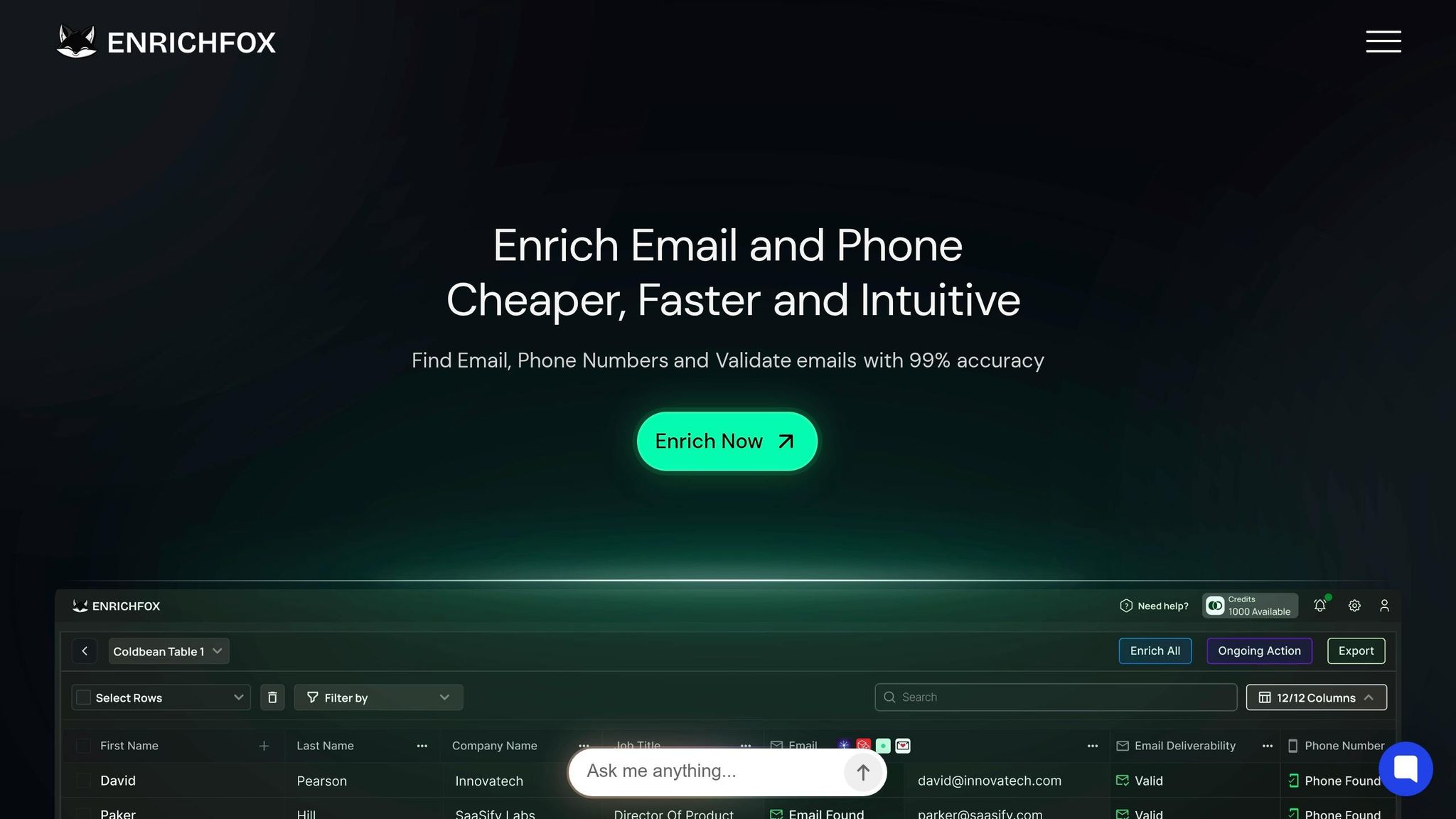
Among the tools compared, Enrichfox.ai stands out as a top choice for bulk validation.
With an impressive 99% email validation accuracy, Enrichfox.ai offers a cost-effective alternative to platforms like ZoomInfo or Apollo. Its pay-per-use pricing model is particularly appealing: $0.00025 per verified email, $0.05 per valid email found, and $0.03 per valid phone number. This approach eliminates the need for expensive subscription plans, making it ideal for startups or teams with fluctuating data volumes.
What sets Enrichfox.ai apart is its robust catch-all detection and phone validation capabilities - features that many competitors either overlook or charge extra for. Its bulk enrichment, API integrations, and quick CSV export options allow you to verify thousands of records within minutes while syncing results directly to your CRM or marketing platform.
"The cost of a single bounced email to your reputation far exceeds the fraction-of-a-cent difference in verification pricing."
- HowToVerifyEmails Blog
For teams managing 60,000+ emails per quarter, Enrichfox.ai’s transparent pricing can save hundreds of dollars compared to tiered subscription plans. Plus, its flexibility - no long-term contracts - means you can scale services up or down based on campaign needs without wasting unused credits.
Wrapping It Up
Catch-all email detection plays a key role in safeguarding your sender reputation and boosting ROI. With 30% to 50% of B2B databases often including catch-all addresses, ignoring these can lead to missed opportunities and bounce rates that exceed acceptable thresholds.
The solution? Use the right tools, score and segment your lists wisely, test emails in smaller batches, and keep your database clean. When done right, catch-all addresses can transform from risky unknowns into potential opportunities. This approach protects your sender reputation and helps you pick the best email validation platform for your needs.
"Catch all verification is not a nice to have anymore, it is a need to have to capture lead potential, minimize bounce and protect your sender reputation." - No2Bounce
Take Enrichfox.ai as an example. With 99% validation accuracy and clear pricing at just $0.00025 per verified email, it removes uncertainty and provides actionable insights instead of vague "unknown" results.
FAQs
What is a catch-all email?
A catch-all email is a type of mailbox designed to accept all emails sent to a domain, regardless of whether the specific email address exists. Essentially, if someone sends an email to an unrecognized address within your domain, the catch-all mailbox will still receive it. While this prevents emails from bouncing back, it can complicate the process of verifying legitimate email addresses.
How can I verify catch-all emails safely?
To verify catch-all emails securely, rely on advanced tools that examine various signals, including DNS settings, SMTP patterns, and behavioral data. Avoid depending entirely on SMTP responses - they can't confirm if individual inboxes are valid. Tools like Enrichfox.ai offer highly accurate solutions for identifying catch-all emails and validating lead information. This approach enhances data quality while minimizing risks. For better results, combine technical verification methods with engagement tracking to safeguard your sender reputation.
What bounce rate is too high?
A bounce rate higher than 2% is typically considered excessive and can harm your sender reputation as well as email deliverability. To keep things running smoothly, make it a habit to validate your email lists regularly and remove any invalid addresses to stay below this limit.